
Project data is not project intelligence. A team can collect task updates, cost figures, milestone dates, risks and resource data every week and still discover the important problem too late.
That gap is where project analytics becomes useful. The goal is not to produce more charts. It is to turn trusted project data into evidence that helps someone decide whether to continue, investigate, escalate or change course.
Project analytics is the discipline of analyzing project data to produce actionable insight for decision-making. Reporting tells you what has been recorded. Analytics asks what the data means, how it is changing, what it is related to and whether action is required.
This distinction is consistent with PMI's current terminology: its 2026 lexicon defines data analytics as the process of analyzing data to derive actionable insights for decision-making. PMI's monitoring-and-controlling guidance also frames project control as translating execution data into knowledge that supports management decisions. The practical implication is simple: analytics is valuable only when it shortens the path from evidence to action.
What is project analytics?
Project analytics is the structured analysis of project facts, variances, trends and relationships in order to support a management decision. It can use schedule, cost, forecast, resource, risk, issue, quality and governance data, but the value does not come from the volume of data. It comes from selecting the few signals that are relevant to a decision.
A useful analytics process therefore starts with a question such as "Do we need to change the plan?", "Is the current forecast still credible?" or "Which project requires leadership attention first?". Only then should it determine which information is necessary.
Project reporting vs project analytics
Reporting and analytics are related, but they are not interchangeable. A report can be accurate and still provide weak decision support.
| Question | Project reporting | Project analytics |
|---|---|---|
| Primary purpose | Describe the recorded state | Interpret what the state means |
| Typical output | Status, totals, lists, RAG indicators | Variance, trend, relationship, anomaly, forecast implication |
| Time orientation | Current and historical | Current, historical and forward-looking |
| Main management question | What happened? | Why does it matter and what requires action? |
| Failure mode | Information overload | False confidence from weak or incomplete data |
A project dashboard can present reporting and analytics in the same interface, but the distinction still matters. A dashboard full of metrics is not automatically analytical. It becomes decision-supporting when it connects a measure to a deviation, a trend, a consequence and a possible action.
Start with the decision, not with the available data
The common sequence is backwards: collect everything that is easy to collect, display it, and then ask managers to work out what matters. A stronger design starts from the decision.
This prevents a frequent mistake: treating whatever is available in Jira, Excel, ERP or status reports as if it were automatically decision-relevant. PMI's guidance on metrics makes the same broader point: measurement should begin by defining what needs to be understood, then selecting and analyzing measurements that can support corrective action.
The five layers of useful project analytics
1. Facts
Start with authoritative inputs: approved budget, actual cost, active commitments, latest forecast, milestone dates, resource assignments, open risks, unresolved issues and pending decisions. A number without a source, timestamp or owner should not silently become a management fact.
2. Variance
Compare the current state with an explicit reference: baseline, approved budget, previous forecast, target capacity or agreed deadline. Variance answers "different from what?". Without a reference, a metric is often only a number.
3. Trend
A single snapshot can look acceptable while the direction is deteriorating. Track the movement of forecast dates, estimate at completion, contingency, blocker age, unresolved risks or resource pressure. Trend answers "is this improving or getting worse?"
4. Relationship
Signals become stronger when they are connected. A delayed supplier deliverable may be linked to a milestone; that milestone may unlock an expensive test phase; the test phase may consume contingency; a delayed decision may be preventing mitigation. Relationship answers "what else does this affect?"
5. Decision
The final layer is not another chart. It is the management choice the evidence is meant to support. Continue as planned? Escalate? Reforecast? Reduce scope? Add capacity? Renegotiate a commitment? A useful analytical view should make that decision easier to frame.
Which project metrics are worth analyzing?
There is no universal list that should be copied into every project. The right set depends on the decisions, constraints and delivery model. In project-control contexts, however, the following categories often produce useful signals when they are connected rather than viewed in isolation.
| Area | Raw fact | Analytical signal | Decision it can support |
|---|---|---|---|
| Schedule | Milestone forecast date | Repeated forecast drift | Escalate dependency or change sequence |
| Cost | Actual + committed + forecast | EAC moving beyond revised budget | Reduce scope, stop spend or request funding |
| Resources | Planned hours vs capacity | Persistent overload in a critical role | Reallocate, hire or replan |
| Risks | Open risk severity and age | High exposure with stalled mitigation | Escalate mitigation ownership |
| Governance | Decision due date | Decision overdue while dependent work waits | Force a decision or change authority |
| Data quality | Last update timestamp | Critical status based on stale data | Do not trust the status; obtain evidence first |
This is where project monitoring and project analytics meet. Monitoring observes and compares. Analytics connects the observed facts to patterns and implications. An executive project dashboard then filters those signals to the decisions leadership can actually make.
Illustrative example: the project is green, but the evidence is deteriorating
The following numbers are illustrative, not a real project.
| Signal | Current view | Analytical interpretation |
|---|---|---|
| Revised budget | €1,000,000 | Reference |
| Actual cost | €540,000 | 54% spent does not by itself indicate the final outcome |
| Active committed cost | €300,000 | Future exposure is already locked |
| Forecast to complete | €210,000 | Expected remaining cost |
| Estimate at completion | €1,050,000 | Forecast is €50,000 above revised budget |
| Critical milestone | Not late | Forecast date has moved by 4, then 7, then 11 days across reviews |
| Decision | Open | Technical choice is 9 days overdue and blocks mitigation |
A status report might still describe the project as broadly under control because the milestone has not yet missed its contractual date and actual spend is below budget. Analytics changes the question. The cost forecast is already beyond the approved budget, milestone drift is persistent, and the mitigation decision is stalled. The decision is not whether the dashboard should become red. The decision is whether management should intervene now.
The signal is not one metric. It is the relationship between cost exposure, forecast movement, schedule drift and an unresolved decision.
Project analytics is only as strong as its data quality
Analytics can create a dangerous illusion of precision when the underlying facts are incomplete. Before treating an insight as decision-grade, check at least four things:
- Freshness: when was the source last updated?
- Authority: is this the approved or authoritative value?
- Completeness: are important costs, commitments, risks or dependencies missing?
- Traceability: can a manager drill from the signal back to the source?
PMI's work on meaningful metrics makes the same underlying point: accurate, relevant data is the first step toward effective project control, and the project manager still has to interpret the implications in context. Analytics does not remove judgement; it gives judgement a better evidence base.
Where AI helps — and where it should not
AI can make project analytics more useful, but only if its role is constrained.
AI is well suited to:
- summarizing a structured analytical snapshot;
- explaining why a deterministic indicator changed;
- connecting several evidence items into a management narrative;
- highlighting missing or inconsistent information;
- drafting questions and candidate actions for review.
AI should not silently become the authoritative source for:
- budget totals;
- actual or committed cost;
- estimate at completion;
- milestone dates;
- resource capacity;
- approved risk or decision status.
AI should interpret project facts. It should not own the facts.
This separation matters for trust. Deterministic calculations remain reproducible and auditable; AI can then operate as an interpretation layer above them. That is more useful than asking a language model to manufacture a project-health score from an unstructured status update.
A practical analytics-to-decision framework
For each important management question, use the same sequence:
- Define the decision. What choice may need to be made?
- Define the evidence. Which facts are necessary to make that choice responsibly?
- Validate the data. Is it current, authoritative, complete and traceable?
- Calculate variance and trend. What changed against the reference and over time?
- Connect relationships. Which other milestones, costs, resources, risks or decisions are affected?
- Surface the signal. State what requires attention, without hiding uncertainty.
- Assign an action. Decision, owner and deadline.
- Review the result. Did the action improve the underlying signal?
This closes the loop that PMI describes in quantitative project management: measurement should lead to analysis, corrective action and review of whether the action worked.
What should a project analytics dashboard show?
A useful analytics dashboard should not try to show every available field. For each signal, it should answer five questions:
| Question | Example |
|---|---|
| What is the current fact? | EAC = €1.05M |
| Compared with what? | Revised budget = €1.00M |
| How is it moving? | EAC increased in the last three reviews |
| What is connected to it? | Supplier delay + test milestone + open design decision |
| What decision may be required? | Approve mitigation, reduce scope or accept variance |
If an executive view cannot make those relationships visible, adding more KPI tiles usually does not solve the problem.
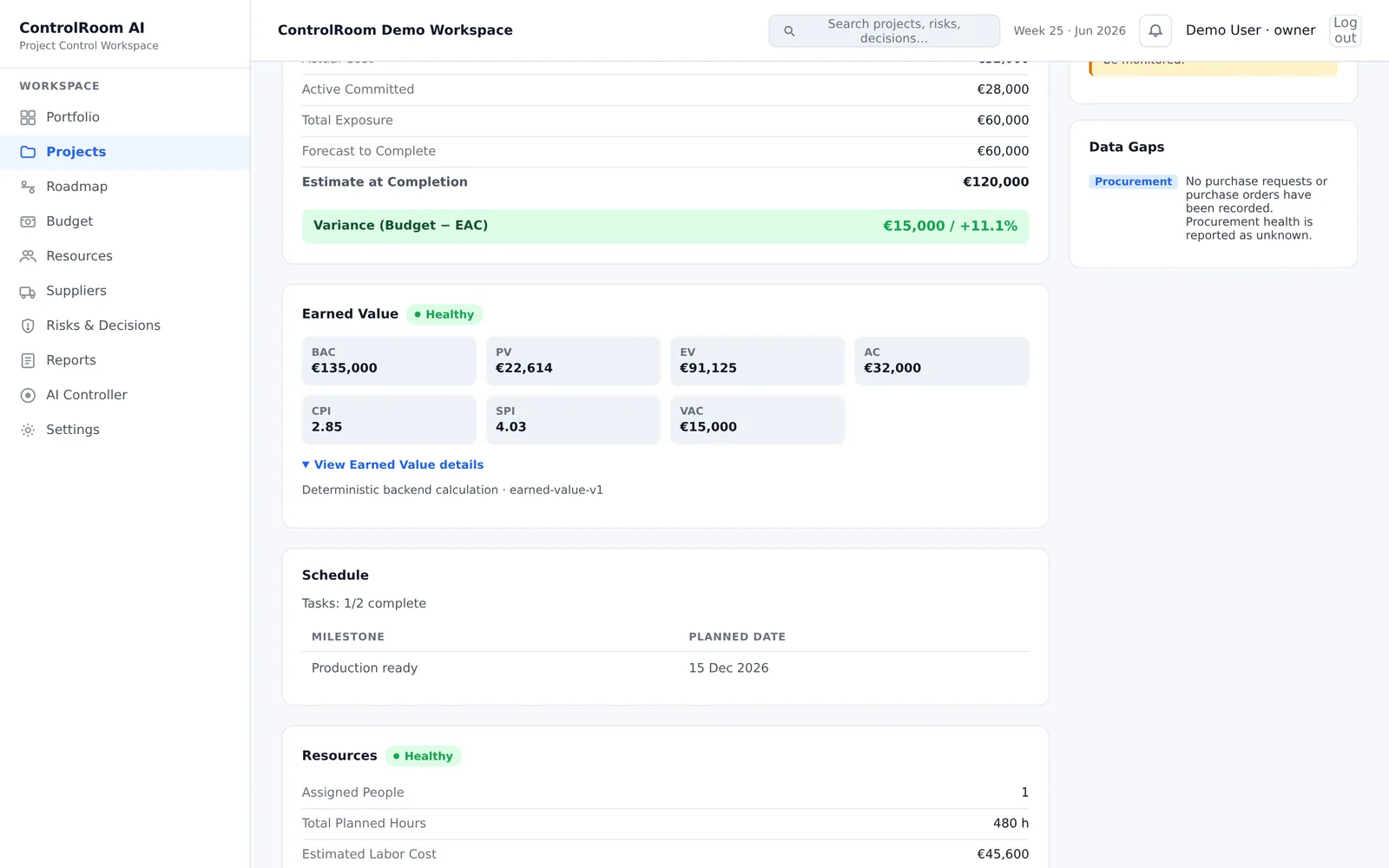
What this looks like in ControlRoom
Project analytics becomes useful when the system connects current state, variance, trend and relationships to the decision that needs attention.
Frequently asked questions about project analytics
What is project analytics?
Project analytics is the analysis of project data to derive actionable insights for decision-making. In practice, it combines trusted project facts with variance, trend and relationship analysis so managers can understand what requires attention and why.
What is the difference between project reporting and project analytics?
Project reporting primarily describes recorded status and performance. Project analytics interprets those facts to identify patterns, trends, relationships and implications that can support a decision.
Which project data should be analyzed?
Analyze the data required by the decision: typically schedule, cost, forecast, resources, risks, issues, dependencies, decisions and data-quality indicators. Do not select metrics only because they are easy to collect.
Can AI perform project analytics?
AI can summarize, explain and connect structured project evidence, but authoritative KPI values should come from deterministic systems and governed project data. AI is most useful as an interpretation layer, not as the source of record.
How can project analytics detect problems earlier?
It can reveal deterioration before a lagging status changes by tracking forecast movement, cost exposure, blocker age, resource pressure, overdue decisions and relationships between those signals over time.
From project data to decisions
Better project analytics is not primarily a visualization problem. It is a decision-design problem.
Start with the decision. Identify the evidence. Validate the facts. Calculate what can be calculated. Track direction, not just state. Connect dependencies and consequences. Then use human judgement — and, where useful, AI interpretation — to decide what happens next.
That is the point at which project data stops being a reporting burden and starts becoming a control system.
Sources and further reading
- Project Management Institute — PMI Lexicon of Project Management Terms, Version 5.0 (2026). Defines data analytics as analysis of data to derive actionable insights for decision-making.
- Project Management Institute — How do you know the status of your project? Project monitoring and controlling. Discusses translating project execution data into actionable knowledge and deciding when corrective action is required.
- Project Management Institute — Quantitative project management: use of metrics for effective project management. Describes a measurement cycle from objectives and metrics through data analysis, corrective action and review.
- Project Management Institute — Meaningful metrics. Emphasizes accurate, relevant data and contextual interpretation for project control.
- ISO 21502:2020 — Project, programme and portfolio management — Guidance on project management. International project-management guidance applicable across delivery approaches and project types.